

If you’ve ever finished uploading a YouTube video and thought, “Wait, did I even do that right?” – you’re not alone.
Most creators have no idea how many steps actually go into growing a channel as a business. They’re focused on filming, editing, posting – and occasionally throwing an Instagram Reel into the void and hoping for the best.
But growing a YouTube channel without a workflow system isn’t a business. It’s a very expensive hobby.
And if you’re a solo creator like me, the mental load of managing it all without a system will eat you alive.
The real cost of not having a YouTube workflow system
I’ve been a solo content creator, travel blogger and YouTuber for years. I know the specific exhaustion of being your own filmmaker, editor, SEO researcher, social media manager, graphic designer, email marketer, administration assistant and accountant – sometimes in the same afternoon.
Even worse, I used to juggle my tasks in my head, thinking it was faster and I had it under control. I didn’t. I was disorganized in a way where I spent time and frustration hunting down files, ideas and designs.
Creating social media posts to promote my videos, I’d have to return to YouTube to find the URL link. Everyone one step felt like ten.
My disorganization was costing me in time, flow, energy and ultimately, money!
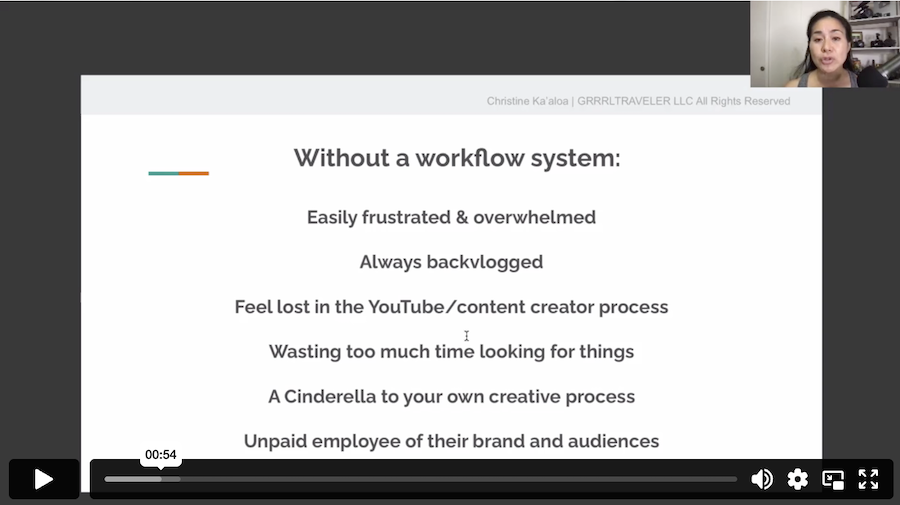
I learned that without a workflow system, it’s easy to:
- • Stay perpetually backlogged on deadlines
- • Waste hours hunting down that one draft, keyword note, or affiliate link you saved “somewhere”
- • Create videos that get views but make you zero money
- • Give in to random creative whims that don’t serve your brand strategy
- • Burn out so hard you go quiet for a month… or longer! (we’ve all been there)
I tried Asana. I tried Trello.
I downloaded various templates designed for business procedures in film production, marketing campaigns, social media, etc… I needed a combination of them all to track, organize and manage my content.
None of it stuck because neither was built for how a YouTube creator actually works.
I needed something I could customize to my specific workflow stages – from idea to SEO to publishing to monetization tracking. I needed a calendar, switchable views to see my workflow from various angles of focus, quick and easy access to data. I wanted everything in one place.
Watch my full video on how I transformed my YouTube channel into a business with a workflow system
Why your YouTube content strategy needs a system behind it
A YouTube content strategy isn’t just a content calendar. It’s a decision-making framework that organizes and tracks what you create, where you are at in the creation process, where files are located, and how it earns.
Every video you make should have a purpose beyond views:
- Is it bringing in affiliate income?
- Is it a lead magnet for your email list?
- Is it targeting a keyword that draws high-CPM advertisers?
- Is it building your authority in your niche so brands want to work with you?
If you can’t answer those questions before you hit record, you’re leaving money on the table.
And while sincere passion and authenticity is a big part of the process, without a solid monetizable business plan, your growth may not be enough fund your creation process in the future .
Let me tell you, the frustration of not being able to earn enough revenue for your creator time, tools and lifestyle needs, can transform your passion into an abusive slave-driving employer who expects you to work for free… and nobody likes that feeling.
A solid workflow system forces you to think about monetization at the idea stage, not as an afterthought after you’ve already put in 12 hours of editing.
I’ll be honest- I focused on being a “creator” for many years, thinking my sincerity and good intentions was enough. I wasn’t realistically focusing on being a “creative business”. Comments and DMs of how your work inspires audiences is not enough to put food on the table or maintain your expenses.
And it hurt me… it hurt my process, my energy, my ability to hire assistance for a crushing workload.
Thankfully, I woke up.
Every artist needs to see a return on investment to survive.
And every solo creator needs a workflow system to keep them sane, organized, on track.

What a YouTube workflow system actually tracks
The goal of a YouTube workflow system isn’t more admin work… it means less mental clutter so you can create smarter and protect your energy.
A good YouTube workflow system helps you organize every stage of production – from brainstorming and keyword research to filming, editing, publishing, and promotion – while keeping your monetization goals in view throughout.
It also helps you see your channel like a business owner, not just a creator.
- Which videos are performing?
- Which ideas are worth your time?
- Where are you bleeding hours without a return?
That shift in perspective is what separates creators who grow from creators who spin their wheels. And it honestly is a big shift in thinking of your content as a business investment vs a creative hobby.
The Jumpstart PowerFLO system: my Airtable workflow for YouTubers
After years of trial-and-error, I built the YouTube Jumpstart workflow system – a YouTube workflow system designed specifically for solo creators and small YouTube businesses.
This is from the help of past coaches and learning their systems mixed with my own workflow system. When I hired a video editor, it sunk in that time was money. So I created a YouTube Editing workflow system to organize, track and time manage his progress and keep all the pieces in one place. It was a simple and easy to use template that i’m quite proud of. I consider it my YouTube adulting.
This workflow the most complete creator-to-business workflow system I’ve built, and it covers:
- A step-by-step video tutorial walking you through how to set up and actually use the system (so it doesn’t collect digital dust like every Notion template you’ve ever downloaded)
- How to use Airtable’s free plan to organize and customize my YouTube production workflow template.
- A system to store everything in one place- from SEO research and video ideas, descriptions, etc..- in one place so you’re not losing your best concepts in a notes app graveyard
- A way to keep monetization thinking built into each video idea from the start – not just chasing views
- Tools to manage your publishing deadlines and keep yourself from falling behind
- A framework that helps you see the bigger picture of your YouTube business and make smarter, more strategic creative decisions
This isn’t a generic productivity template you’d find in Trello. It’s built around how a YouTube creator actually works – with the complexity and the chaos and the solo workload fully accounted for.
Good workflow systems prevent creator burnout
Bottom line: Creator burnout in this era of The Online Creator can feel inevitable.
This part matters more than creators admit.
Creator burnout isn’t just about being tired. It’s about juggling multiple platforms and processes not only to publish your YouTube video, but also promote your work to audiences, build a community that fuels your brand and its acknowleding that you’ll also spend enormous energy on some work that doesn’t compound into anything.
Some videos take off. Others flop. It’s all a swinging pendulum. As a creator, your emotions can swing with it. And sadly, it can occasionally get to feeling like you’re at Las Vegas just gambling at slot machines.
When your process is disorganized, you feel the pendulum more, you work harder and build less. That is exhausting in a very specific, demoralizing way.
A workflow system doesn’t make you less creative. It gives your creativity a structure to land in – so that the good ideas actually get made, published, and monetized instead of disappearing into a sticky note. You’re pushing to build a business… not just grow views for Adsense dollars.
Sustainable content creation is possible. It just requires treating your channel like the business it is.
Ready to build a YouTube system that actually works for you?
If you’re a small YouTube creator who wants to grow smarter, earn more from the content you’re already making, and stop feeling like an unpaid employee of your own channel – my Youtube Jumpstart workflow system was built for you.


